
How to Share a Revised Video Without Losing Feedback
Open the existing video post and upload your replacement as a new version. Keep using the same review link. Earlier notes stay with the cut reviewers watched when they left them.
Upload a new version under the same link
Open the existing post
Find the first cut in Content and open it. Use its upload version action instead of creating a fresh post.
Upload and verify the revision
Choose the replacement file, wait for it to finish, and play the Latest version. Check the opening, changed section, and end.
Confirm the change for the client
Send the same link with a short change summary. Ask the client to confirm the current version, then get a fresh sign-off if required.
Keep first-round feedback accessible
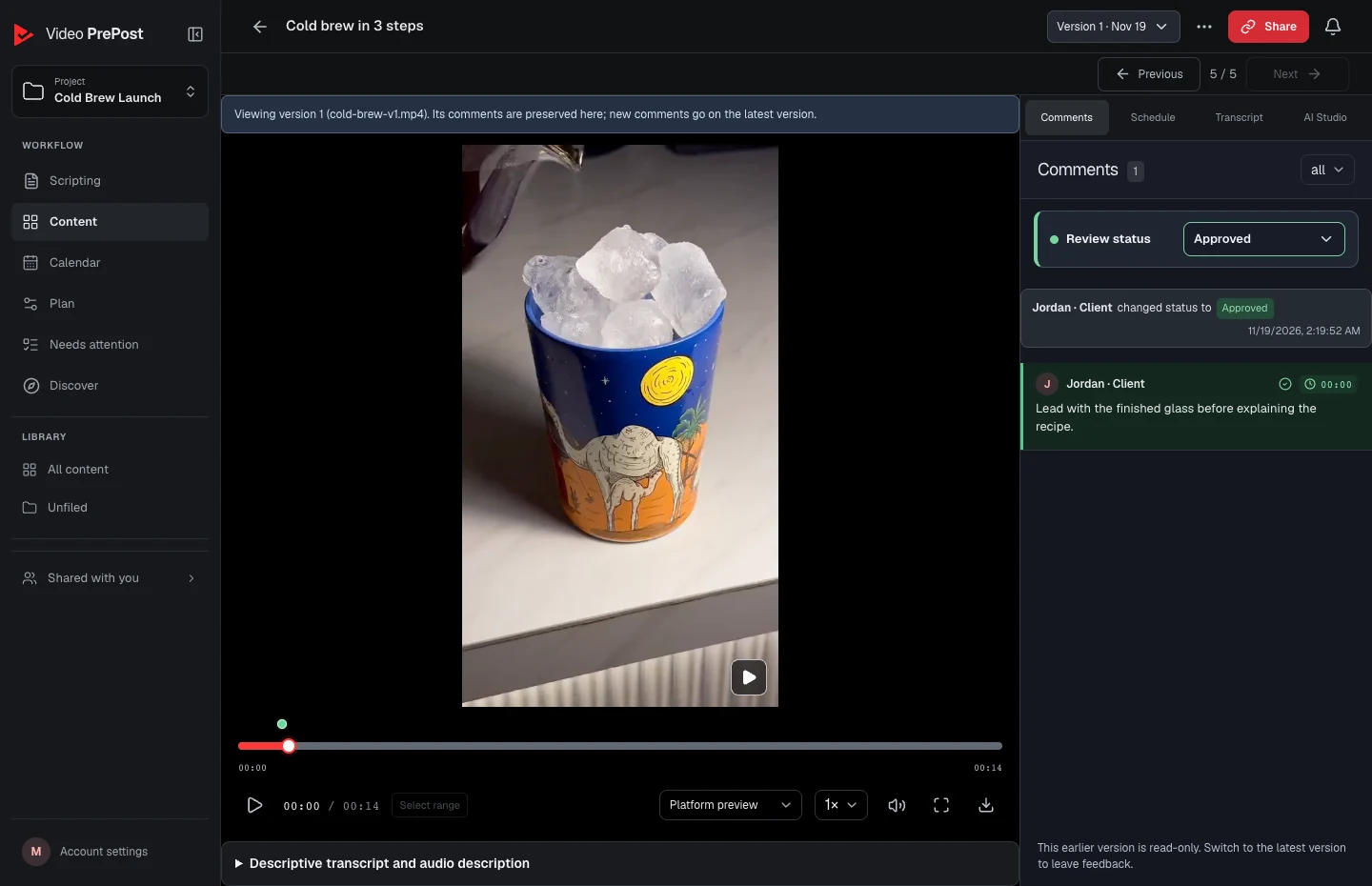
V1 of the cold-brew reel has a note asking for the finished glass earlier. After adding V2, the editor can open V1 to check that request while the client sees the updated cut under the same review.
Keep a record of the earlier edit decisions
Uploading a replacement creates a version of the existing video post. It keeps earlier cuts and the notes attached to those cuts available in the version history.
A single review saves a client from looking for a different link every round. It also lets the editor check exactly what was requested on V1 and confirm that the change made it into V2.